---
title: How Patient Chart Delete/Merge Requests Work
description: Learn how patient chart merge requests work, keeping one active chart, and what happens next.
---
[Skip to content](https://knowledge.populateemr.com/how-patient-chart-merge-requests-work#main-content)
English
Show submenu for translations
[More support](https://knowledge.populateemr.com/kb-tickets/new?hsLang=en) [Customer portal](https://support.populateemr.com/tickets?hsLang=en)

Open main navigation
Close main navigation
- English
Show submenu for translations
- [More support](https://knowledge.populateemr.com/kb-tickets/new)
- [Customer portal](https://support.populateemr.com/tickets)
- [Contact us](mailto:support@populate.com)
[Contact us](mailto:support@populate.com)
How can we help you?
- There are no suggestions because the search field is empty.
1. [Populate Help Desk](https://knowledge.populateemr.com/?hsLang=en)
2. [Support](https://knowledge.populateemr.com/support?hsLang=en)
September 15, 2026
# How Patient Chart Delete/Merge Requests Work
## Patient chart merge requests can be submitted for duplicate patient charts.
### **How do patient chart merge requests work?**
If one chart should be removed, mark one duplicate with **DELETE** as the middle name before submitting the request.
### **What should be done before a merge request is processed?**
Before the request is completed:
1. Mark the newer duplicate chart as **Inactive** from **Charts \> Demographics**
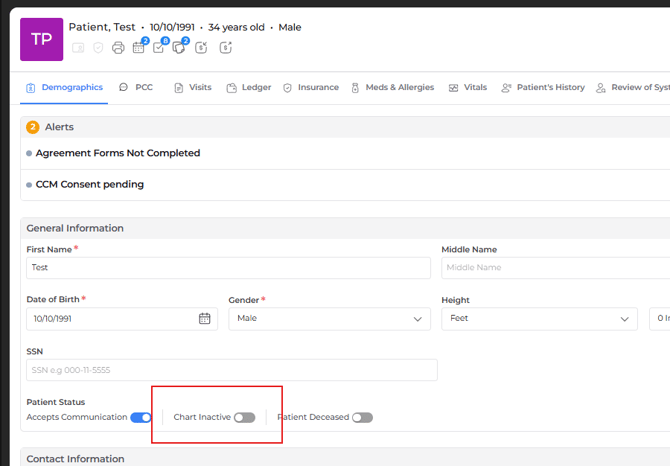
2. Keep only **one** active chart for the patient.
3. Make sure no patient activity is recorded in the chart that will be deleted.
### **How to submit a delete/merge chart request?**
Submit the request by completing the form below with the necessary details.
#### **[\[Complete Merge Request Form →\]](https://docs.google.com/forms/d/e/1FAIpQLSdluueHpXwli5swKOALKGfi-iQmc9dTIzFfrKK9aTZU0KkneQ/viewform?usp=publish-editor)**
### **How long does chart merging take?**
Chart merge requests require time to complete and are processed later. Requests can also be moved forward for review when needed.
### **What happens after the request is submitted?**
The merge request is added for processing, and an update is provided when it has been completed.
- [FAQ](https://knowledge.populateemr.com/faq?hsLang=en)
- [Support](https://knowledge.populateemr.com/support?hsLang=en)
- [Billing](https://knowledge.populateemr.com/billing?hsLang=en)
- [Appointments](https://knowledge.populateemr.com/appointments?hsLang=en)
- [Visit Notes](https://knowledge.populateemr.com/visit-notes?hsLang=en)
- [Charts](https://knowledge.populateemr.com/charts?hsLang=en)
- [Encounters](https://knowledge.populateemr.com/encounters?hsLang=en)
- [Intake](https://knowledge.populateemr.com/intake?hsLang=en)
- [To-Dos & Stickies](https://knowledge.populateemr.com/to-dos-stickies?hsLang=en)
- [Fax & Reports](https://knowledge.populateemr.com/fax-reports?hsLang=en)
- [Reports](https://knowledge.populateemr.com/reports?hsLang=en)
- [Settings](https://knowledge.populateemr.com/settings?hsLang=en)
- [Rachel—AI Agent](https://knowledge.populateemr.com/rachel-ai-agent?hsLang=en)
- [Forms](https://knowledge.populateemr.com/forms?hsLang=en)
- [Populate Continuous Care (PCC)](https://knowledge.populateemr.com/populate-continuous-care-pcc?hsLang=en)
[](https://knowledge.populateemr.com/?hsLang=en)
6790 Embarcadero Ln #100, Carlsbad, CA 92011
[mailto:support@populate.com](mailto:support@populate.com)
Copyright © 2025, Populate EMR, Inc.