---
title: How to Find and Unarchive Claims
description: "View archived claims by filtering Claim Status to \"Archived\"; edit and resubmit a claim to remove it from the archived state."
---
[Skip to content](https://knowledge.populateemr.com/how-to-find-and-unarchive-claims#main-content)
English
Show submenu for translations
[More support](https://knowledge.populateemr.com/kb-tickets/new?hsLang=en) [Customer portal](https://support.populateemr.com/tickets?hsLang=en)

Open main navigation
Close main navigation
- English
Show submenu for translations
- [More support](https://knowledge.populateemr.com/kb-tickets/new)
- [Customer portal](https://support.populateemr.com/tickets)
- [Contact us](mailto:support@populate.com)
[Contact us](mailto:support@populate.com)
How can we help you?
- There are no suggestions because the search field is empty.
1. [Populate Help Desk](https://knowledge.populateemr.com/?hsLang=en)
2. [Billing](https://knowledge.populateemr.com/billing?hsLang=en)
September 1, 2026
# How to Find and Unarchive Claims
This article explains how to find archived claims and change a claim's archived status.
How can I find archived claims?
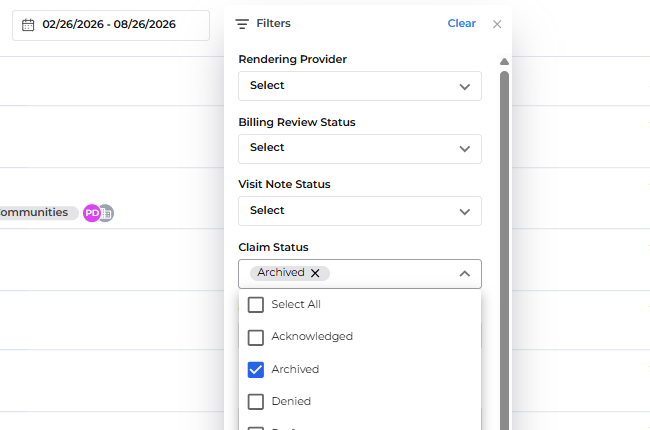
To find archived claims, set the Claim Status filter to "Archived" and run the search. This will display claims that are currently archived.
How do I remove a claim from the archived state?
To remove a claim from the archived state, open the claim, make any required edits, and submit it. The system will assign a new status based on the submission response from the payer.
What steps should I follow to view and unarchive a specific claim?
1. Open the billing or claims search interface.
2. Set the Claim Status filter to "Archived."
3. Search or filter by patient or date of service to locate the claim.
4. Open the archived claim you want to change.
5. Edit the claim as needed (for example, correct coding or billing details).
6. Submit the edited claim. The system will update the claim status based on the payer's submission response.
Troubleshooting: I still can't find the claim after filtering by Archived — what can I try?
- Confirm the Claim Status filter is set to "Archived" before searching.
- Adjust patient or date filters to broaden the search if needed.
- Verify that you have permission to view archived claims; contact your system administrator if the Archived status option is not available in your filter.
**Conclusion:** Use the **Claim Status** filter set to **Archived** to view archived claims. To remove a claim from the archived state, edit the claim and submit it; the system will assign a new status based on the payer's response.
- [FAQ](https://knowledge.populateemr.com/faq?hsLang=en)
- [Support](https://knowledge.populateemr.com/support?hsLang=en)
- [Billing](https://knowledge.populateemr.com/billing?hsLang=en)
- [Appointments](https://knowledge.populateemr.com/appointments?hsLang=en)
- [Visit Notes](https://knowledge.populateemr.com/visit-notes?hsLang=en)
- [Charts](https://knowledge.populateemr.com/charts?hsLang=en)
- [Encounters](https://knowledge.populateemr.com/encounters?hsLang=en)
- [Intake](https://knowledge.populateemr.com/intake?hsLang=en)
- [To-Dos & Stickies](https://knowledge.populateemr.com/to-dos-stickies?hsLang=en)
- [Fax & Reports](https://knowledge.populateemr.com/fax-reports?hsLang=en)
- [Reports](https://knowledge.populateemr.com/reports?hsLang=en)
- [Settings](https://knowledge.populateemr.com/settings?hsLang=en)
- [Rachel—AI Agent](https://knowledge.populateemr.com/rachel-ai-agent?hsLang=en)
- [Forms](https://knowledge.populateemr.com/forms?hsLang=en)
- [Populate Continuous Care (PCC)](https://knowledge.populateemr.com/populate-continuous-care-pcc?hsLang=en)
[](https://knowledge.populateemr.com/?hsLang=en)
6790 Embarcadero Ln #100, Carlsbad, CA 92011
[mailto:support@populate.com](mailto:support@populate.com)
Copyright © 2025, Populate EMR, Inc.