---
title: "Understanding SNAP and AI Dictation: Differences & Limits"
description: Get real‑time SOAP‑style notes with SNAP and section‑level verbatim transcription with Dictation
---
[Skip to content](https://knowledge.populateemr.com/understanding-snap-and-ai-dictation-differences-limits#main-content)
English
Show submenu for translations
[More support](https://knowledge.populateemr.com/kb-tickets/new?hsLang=en) [Customer portal](https://support.populateemr.com/tickets?hsLang=en)

Open main navigation
Close main navigation
- English
Show submenu for translations
- [More support](https://knowledge.populateemr.com/kb-tickets/new)
- [Customer portal](https://support.populateemr.com/tickets)
- [Contact us](mailto:support@populate.com)
[Contact us](mailto:support@populate.com)
How can we help you?
- There are no suggestions because the search field is empty.
1. [Populate Help Desk](https://knowledge.populateemr.com/?hsLang=en)
2. [Visit Notes](https://knowledge.populateemr.com/visit-notes?hsLang=en)
September 1, 2026
# Understanding SNAP and AI Dictation: Differences & Limits
## SNAP (Smart Note Automation Program) creates structured visit notes by listening to patient–provider conversations and generating a medical-focused summary in real time
**How does SNAP capture and generate notes?**
SNAP listens to the patient–provider interaction and generates a structured, billable SOAP-style note in real time. It is designed to capture and retain medically relevant information while omitting casual or non‑medical conversation. Notes can be generated and saved directly from the mini player.
**Can I continue working elsewhere in the EMR while SNAP records?**
Yes. SNAP allows multitasking during recording: you can navigate away from the visit note to other parts of the EMR while the conversation is being recorded, and later return to the visit note with one click to review the generated note.
**What is Dictation and how does it differ from SNAP?**
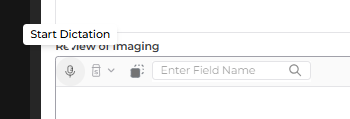
Dictation is a transcribing feature available per section of each template that captures exact spoken words (rather than producing a medical summary). It is the microphone icon on the top navigation bar of each section as shown bellow. It is intended for precise transcription within template sections, while SNAP focuses on summarizing medically relevant content across the visit.
**What issues might arise with SNAP and Dictation?**
- SNAP may omit casual or non‑medical speech (e.g., small talk) because it prioritizes medically relevant content; using SNAP as a verbatim dictation tool may produce summarized rather than exact transcriptions.
- Dictation may produce incorrect spellings of medical terms (for example, difficulty spelling “hallux”) and other domain‑specific vocabulary may require manual correction.
**Troubleshooting: common problems and practical steps**
1. If the note lacks exact phrasing you dictated:
- Use **Dictation** per template section when you need verbatim transcription rather than a summary.
2. If a medical term is misspelled in the transcription:
- **Manually correct** the term in the generated note.
3. If you want the full visit note while working elsewhere:
- Use **SNAP’s mini player** to generate and save the note, then return to the visit note with one click to review or edit.
4. If you need integration with other systems:
- Use **copy/paste** workflows where necessary.
SNAP provides real‑time, medical‑focused note generation and supports multitasking within the EMR, while Dictation offers section‑level verbatim transcription with and may require manual corrections for specialized terminology.
- [FAQ](https://knowledge.populateemr.com/faq?hsLang=en)
- [Support](https://knowledge.populateemr.com/support?hsLang=en)
- [Billing](https://knowledge.populateemr.com/billing?hsLang=en)
- [Appointments](https://knowledge.populateemr.com/appointments?hsLang=en)
- [Visit Notes](https://knowledge.populateemr.com/visit-notes?hsLang=en)
- [Charts](https://knowledge.populateemr.com/charts?hsLang=en)
- [Encounters](https://knowledge.populateemr.com/encounters?hsLang=en)
- [Intake](https://knowledge.populateemr.com/intake?hsLang=en)
- [To-Dos & Stickies](https://knowledge.populateemr.com/to-dos-stickies?hsLang=en)
- [Fax & Reports](https://knowledge.populateemr.com/fax-reports?hsLang=en)
- [Reports](https://knowledge.populateemr.com/reports?hsLang=en)
- [Settings](https://knowledge.populateemr.com/settings?hsLang=en)
- [Rachel—AI Agent](https://knowledge.populateemr.com/rachel-ai-agent?hsLang=en)
- [Forms](https://knowledge.populateemr.com/forms?hsLang=en)
- [Populate Continuous Care (PCC)](https://knowledge.populateemr.com/populate-continuous-care-pcc?hsLang=en)
[](https://knowledge.populateemr.com/?hsLang=en)
6790 Embarcadero Ln #100, Carlsbad, CA 92011
[mailto:support@populate.com](mailto:support@populate.com)
Copyright © 2025, Populate EMR, Inc.